From Core Rules. Read this book’s lore. Readable tables and original source diagrams.
CLOSE COMBAT
When a combat is resolved due to a model performing a Fight action, each model gets to make their attacks in an order according to their Initiative using the following steps:
Determine Who Can Fight
Choose Weapons
Determine Attack Dice
Declare Targets
Determine Initiative
Resolve Attacks
Consolidate
1. DETERMINE WHO CAN FIGHT
When resolving a combat, only the activating model and any enemy models Engaged with them may fight.
2. CHOOSE WEAPONS
Each model selects which weapon(s) they will be using for the combat:
The activating model selects a weapon with either the Melee or Light trait to be their Primary weapon and, if they have two close combat weapons or weapons with the Light trait (in any combination), they may select another such weapon to be their Secondary weapon.
All other models select one close combat weapon or weapon with the Light trait to be their Primary weapon.
Hand Weapons: If a Fighter does not have any weapons with either the Melee or Light traits, they are still considered to have a weapon about their person that can be used in a fight. This weapon has the following profile:
Str AP
Traits
SR LR
Melee
Hand weapon
1
Note that if a Vehicle does not have any close combat weapons then it cannot perform any close combat attacks.
3. DETERMINE ATTACK DICE
The activating model calculates their Attack dice in the following manner:
Primary Weapon: The number of Attack dice with the model's Primary weapon is equal to the model's Attacks characteristic, +1 if they performed the Charge action this activation.
Secondary Weapon: The model only has one Attack dice with their Secondary weapon (note: some skills and traits may affect this).
All other models only make one attack with their Primary weapon regardless of their Attacks characteristic (note: some skills and traits may affect this).
Pistols at Close Quarters: Regardless of whether it is selected as a Primary or Secondary weapon, a weapon with the Light trait can only ever make one attack regardless of the model's Attacks characteristic, skills, traits or any other modifiers; any additional attacks are wasted.
4. DECLARE TARGETS
When a model makes a close combat attack, it must be against an eligible target. An eligible target is an enemy model they are Engaged with (a model that is in base contact). If there is more than one eligible target, close combat attacks can be split between them as the controlling player wishes.
5. DETERMINE INITIATIVE
Each combatant fights in an order determined by their Initiative characteristic with the following modifiers:
If either the model's Primary or Secondary weapon has the Unwieldy trait, the model's Initiative characteristic is set to 1 before any other modifiers are applied.
If the model has successfully performed the Charge action this activation, they then increase their Initiative characteristic by 2.
Each model resolves their attacks in an order based on their revised Initiative characteristic, unless they were taken Out of Action or Seriously Injured/Damaged by a model acting with a higher modified Initiative.
Simultaneous Attacks: If multiple models are resolving attacks with the same modified Initiative characteristic, they will attack at the same time. To simplify this, the activating model's attacks are resolved first, followed by any other models. Causing an enemy model to become Seriously Injured/ Damaged or be taken Out of Action does not prevent them resolving their attacks if they have the same modified Initiative characteristic.
6. RESOLVE ATTACKS
Starting with the model with the highest modified Initiative characteristic, complete the following steps before moving on to the next highest and so on until all models have fought:
A. Make Hit Roll(s) B. Resolve Hits
A. MAKE HIT ROLL(S)
Each Attack dice is used to make a Hit roll. A Hit roll is a Weapon Skill test made against the WS of the attacking model. Roll separately for each different weapon being used by the model and/or for different targets.
Note that BS is not used to make Hit rolls in close combat, even when a ranged weapon with the Light trait is used. When making a Hit roll for a weapon with the Light trait, a WS test is made, exactly as described above.
Engaging Models Out of Line of Sight: If a model performed either the Charge or Engage action this activation, targeting a model that was not in their Line of Sight when the action was declared, apply a -1 modifier to their Hit rolls.
Assists: When a model makes a close combat attack, they can claim an assist if at least one other friendly model is:
Engaged with the target of the attack.
Not Engaged with any other models from the same gang as the target of the attack.
If a model claims an assist in this way, they add a +1 modifier to the Hit roll (multiple assists cannot be claimed).
Interference: When a model makes a close combat attack, they may suffer interference if at least one other enemy model is:
Engaged with the attacker.
Not Engaged with any other models from the same gang as the attacker.
If a model suffers interference in this way, they suffer a -1 modifier to the Hit roll (multiple models cannot provide interference to the same attack).
Rolls of a Natural 1: If, when making a close combat attack, the Hit roll is a natural 1, the attack automatically misses, regardless of any modifiers that may apply.
Rolls of a Natural 6: If, when making a close combat attack, the Hit roll is a natural 6, the attack automatically hits, regardless of any modifiers that may apply.
B. RESOLVE HITS
Each attack that scores a Hit is resolved as described on page 76.
7. CONSOLIDATE
If all enemy models that the activating model was Engaged with have gone Out of Action or are Seriously Injured/Damaged, the model may move up to their Initiative in inches in any direction. During this move, they may move within 1" of enemy models, but must end the move at least 1" away from all enemy models.
RESOLVE HITS
Whenever a successful Hit roll is made against a model, there is a good chance that Hit will cause that model to suffer a degree of damage. When a model suffers a Hit, follow this sequence:
Make a Wound Roll
Make a Save Roll
Inflict Damage
1. MAKE A WOUND ROLL
Whenever a Wound roll is made against a model, it is always the opposing player that makes it. Cross reference the weapon's Strength with the hit model's Toughness and roll a D6 on the table below to determine if the model is wounded by the attack:
| Strength vs Toughness | D6 Roll Required |
|---|---|
| Is the Strength TWICE the Toughness or greater? | 2+ |
| Is the Strength GREATER than the Toughness? | 3+ |
| Is the Strength EQUAL to the Toughness? | 4+ |
| Is the Strength LOWER than the Toughness? | 5+ |
| Is the Strength HALF the Toughness or lower? | 6+ |
2. MAKE A SAVE ROLL
If a Hit results in a successful Wound roll, the model may be able to make a Save roll. In order to make a Save roll, roll a D6 and apply the weapon's Armour Piercing characteristic as a modifier. If the result is equal to or greater than the model's Save characteristic, the Hit does no damage.
Only one Save roll may be made for each Hit that successfully wounds, regardless of how many different types of Save a model may have. For example, if a model has a 5+ Armour save and a 6+ Invulnerable save, they may only attempt a Save roll against a successful Wound roll with one of these saves.
Players should note that some weapon traits will disallow Save rolls. For example, the Gas trait states that no Save roll can be made. In such cases, regardless of any modifiers, no Save roll can be made.
If a model has been successfully wounded by several attacks at the same time, then the hit model's opposing player chooses the order in which the attacks are resolved.
Cover: Being behind cover offers a model additional protection against ranged attacks. If a model is in cover then apply the following modifiers to their Save roll:
Target is within the attacking weapon's Short Range +1.
Target is within the attacking weapon's Long Range +2.
When a model is hit by a weapon with the Blast (3"/5") trait that has scattered, check if the model is in cover from the direction of the centre of the Blast marker. If the shot did not scatter, check from the direction of the firing model for the targeted model, and the centre of the Blast marker for all other models hit.
Invulnerable Saves: Some saves are denoted as being Invulnerable saves. These are not affected by modifiers from any source (for example, an attack's AP and Cover).
Rolls of a Natural 1 or 2: A roll of a natural 1 or 2 when making a Save roll is always an automatic failure, regardless of any modifiers that may apply.
3. INFLICT DAMAGE
If a successful Wound roll is not saved or mitigated, then the target loses a
INJURY DICE
Wound. If this results in the model's Wounds characteristic dropping to zero (or
Injury dice are if the Wounds characteristic is already zero), the target's opposing player rolls a special dice used number of Injury dice equal to the weapon's Lethality characteristic. They then to determine the select one of the Injury dice and apply the result as follows:
severity of the injury a Fighter suffers.
- Injured: The model has a lucky escape and avoids any further damage,
Each face is marked remaining Injured or Damaged. An Injured/Damaged model gains no benefits from any of their skills.
with one of three different symbols.
- Serious Injury: If the target is a Fighter they become Seriously Injured, if
These are:
the target is a Vehicle it becomes Seriously Damaged. A Seriously Injured/ Damaged model may only perform limited actions during their activation. If the model is already Seriously Injured/Damaged this result has no effect.
- Out of Action: The model either succumbs to their injuries or suffers enough damage that their Vehicle is rendered inoperable. Either way, they are immediately removed from play and will take no further part in this battle. Roll
OUT OF ACTION
on the Lasting Injury or Lasting Damage table for them (see pages 78-79).
Note that a model's Wounds characteristic may never drop below zero. If they would lose a Wound when their characteristic is already zero, their Wounds characteristic remains unchanged.
MODELS ON ZERO WOUNDS
If an effect ever results in a model's Wounds characteristic becoming zero, the model is automatically Injured/Damaged. If an Injured/Damaged model has their Wounds characteristic restored to a positive value they are no longer Injured/Damaged. If a Seriously Injured/Damaged model ever has its Wounds characteristic restored to a positive value, they become Active unless they are within 1" of an enemy model, in which case they are immediately taken Out of Action.
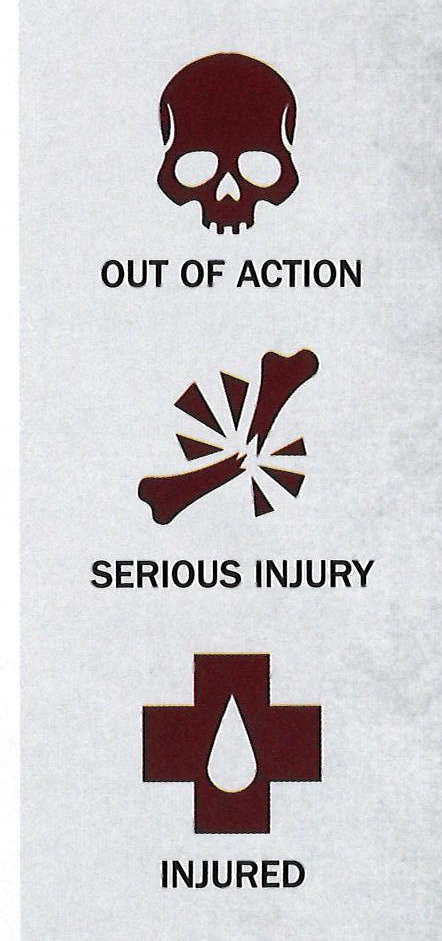 Injury dice results Open full-size chart ↗
SERIOUS INJURY
NERVE CHECKS
Seeing fellow models being taken out nearby can unnerve models. If a model is within 3" of a friendly model that goes Out of Action, they must make a Cool check. If the check is failed,
INJURED
they become Suppressed.
LASTING INJURIES & LASTING DAMAGE
Whenever a model goes Out of Action, the opposing player makes a D66 roll and looks up the result on the relevant table; for Fighters, the Lasting Injury table (see below), for Vehicles, the Lasting Damage table (see opposite). During Campaign play, the result is applied against the model and a note of the Lasting Injury is made on their Gang Roster. If a Lasting Injury/Damage is rolled that a model has already received, then its effects are applied again.
If a Lasting Injury/Damage cannot be applied to a model, either because it grants a skill that they already have or would take a characteristic above or below its maximum or minimum, disregard the part that cannot be applied, but apply the rest of the result.
If, for whatever reason, multiple effects cause a model to go Out of Action, only roll once on the table.
Rolling for Lasting Injuries and Lasting Damage must be done during Campaign play. Should players wish, they can forgo this step during Skirmish play, though making the roll and noting the result can add greatly to the narrative of the battle.
LASTING INJURY TABLE
| D66 | Lasting Injury |
|---|---|
| 11 | Lesson Learnt: The Fighter earns D3 XP. |
| 12 | Eternal Enmity: The Fighter gains the Hatred (X) Condition where X is the type of gang that took them Out of Action. |
| 13 | Bitter Enmity: The Fighter gains the Hatred (X) Condition where X is the gang that took them Out of Action. |
| 14 | Personal Enmity: The Fighter gains the Hatred (X) Condition where X is the model that took them Out of Action. If they were not taken Out of Action as a result of an enemy model's action, treat this result as Bitter Enmity. |
| 15 | Horrid Scars: The Fighter gains the Fearsome Condition. |
| 16 | Impressive Scars: The Fighter increases their Leadership characteristic by 1. |
| 21-26 | Out Cold: The Fighter takes no further part in the battle, but suffers no long-term effects. |
| 31-46 | Grievous Wound: The Fighter goes into Recovery. |
| 51 | Eye Injury: The Fighter goes into Recovery and reduces their Ballistic Skill characteristic by 1. |
| 52 | Hand Injury: The Fighter goes into Recovery and reduces their Weapon Skill characteristic by 1. |
| 53 | Hobbled: The Fighter goes into Recovery and reduces their Movement characteristic by 1. |
| 54 | Spinal Injury: The Fighter goes into Recovery and reduces their Strength characteristic by 1. |
| 55 | Enfeebled: The Fighter goes into Recovery and reduces their Toughness characteristic by 1. |
| 56 | Head Injury: The Fighter goes into Recovery and reduces their Leadership characteristic by 1. |
| 61-62 | Captured: The Fighter has been Captured (see page 86). |
| 63-65 | Critical Injury: The Fighter is in a critical condition; if their injuries are not successfully treated by a visit to the Doc (see page 88) in the Post-cycle Sequence, they will die. |
| 66 | Memorable Death: The Fighter is killed instantly - not even the most talented Doc can save them. If the injury was caused by an enemy model, that model earns 1 extra XP. |
LASTING DAMAGE TABLE
| D66 | Lasting Damage |
|---|---|
| 11 | Lesson Learnt: The Vehicle earns D3 XP. |
| 12 | Eternal Enmity: The Vehicle gains the Hatred (X) Condition where X is the type of gang that took it Out of Action. |
| 13 | Bitter Enmity: The Vehicle gains the Hatred (X) Condition where X is the gang that took it Out of Action. |
| 14 | Personal Enmity: The Vehicle gains the Hatred (X) Condition where X is the model that took it Out of Action. If it was not taken Out of Action as a result of a model's action, treat this result as Bitter Enmity. |
| 15-16 | Percussive Repair: The Vehicle may remove one Lasting Damage previously suffered. |
| 21-26 | Superficial Damage: The Vehicle takes no further part in the battle, but suffers no long-term effects. |
| 31-46 | Major Damage: The Vehicle goes into Recovery. |
| 51-52 | Busted Sights: The Vehicle goes into Recovery and reduces its Ballistic Skill characteristic by 1. |
| 53 | Drive System Fault: The Vehicle goes into Recovery and reduces its Movement characteristic by 1. |
| 54 | Buckled Frame: The Vehicle goes into Recovery and reduces its Toughness characteristic by 1. |
| 55-56 | Engine Fracture: The Vehicle explodes - all models (both friend and foe) within 3" suffer a Str 3, AP-, L1 Hit. The Vehicle then goes into Recovery and reduces its Wounds characteristic by 1. |
| 61-62 | Captured: The Vehicle has been Captured (see page 86). |
| 63-65 | Critical Damage: The Vehicle explodes. Until the Vehicle is repaired by a visit to the chop shop (see page 89), it may not take part in any battles or perform Post-cycle Actions. All models (both friend and foe) within 6" suffer a Str 4, AP -1, L1 Hit. |
| 66 | Catastrophic Explosion!: The Vehicle is destroyed - not even the most talented mechanic can repair it. Delete the Vehicle from the Gang Roster. All models (both friend and foe) within 6" suffer a Str 6, AP -2, L2 Hit. If the injury was caused by an enemy model, that model earns 1 extra XP. |
GOING INTO RECOVERY
Some results will cause a model to go into Recovery. During Campaign play, this means that the model's In Recovery box is checked on the Gang Roster and they cannot take part in any other battles this Campaign Cycle, nor may they perform Post-cycle Actions, as they are recovering from their injuries or conducting repairs. During the Update Roster step of the Post-cycle Sequence, the model's In Recovery box will be cleared and they will once again be able to take part in battles.